About






About Alphafold Analysis

af-analysis is a python package for the analysis of AlphaFold protein structure predictions.
This package is designed to simplify and streamline the process of working with protein structures
generated by:
Source code repository: https://github.com/samuelmurail/af_analysis
Statement of Need
AlphaFold 2 and its derivatives have revolutionized protein structure prediction, achieving remarkable accuracy.
Analyzing the abundance of resulting structural models can be challenging and time-consuming.
Existing tools often require separate scripts for calculating various quality metrics (pDockQ, pDockQ2, LIS score) and assessing model diversity.
af-analysis addresses these challenges by providing a unified and user-friendly framework for in-depth analysis of AlphaFold 2 results.
Main features
Import AlphaFold or ColabFold prediction directories as pandas DataFrames for efficient data handling.
Calculate and add additional structural quality metrics to the DataFrame, including:
pDockQ
pDockQ2
LIS score (cLIS and iLIS scores)
ipSAE (and the ipTM matrix derived from PAE)
Visualize predicted protein models.
Cluster generated models to identify diverse conformations.
Select the best models based on defined criteria.
Add your custom metrics to the DataFrame for further analysis.
Installation
af-analysisis available on PyPI and can be installed usingpip:
pip install af_analysis
You can install last version from the github repo:
pip install git+https://github.com/samuelmurail/af_analysis.git@main
AF-Analysis can also be installed easily through github:
git clone https://github.com/samuelmurail/af_analysis
cd af_analysis
pip install .
Optional GUI (Flask)
You can install and launch the GUI with:
pip install "af-analysis[gui]"
af_analysis_gui
Then open http://127.0.0.1:5000 in your browser. The GUI allows loading result folders, viewing tables, selecting models, and plotting pLDDT/PAE.
For developers, you can install the package in editable mode:
git clone https://github.com/samuelmurail/af_analysis
cd af_analysis
pip install -e .
Conda environment
A conda environment file is provided to create an environment with all dependencies:
conda env create -f environment.yml
conda activate af_analysis
Documentation
The complete documentation is available at ReadTheDocs.
A notebook showing the basic usage of the
af_analysislibrary can be found here.Alternatively you can test is directly on Google colab:
Usage
Importing data
Create the Data object, giving the path of the directory containing the results of the alphafold2/colabfold run.
import af_analysis
my_data = af_analysis.Data('MY_AF_RESULTS_DIR')
In most cases, the Data object will automatically detect the format of the results (AlphaFold 2, AlphaFold 3, ColabFold). If needed, you can specify the format using the format argument:
my_data = af_analysis.Data('MY_AF_RESULTS_DIR', format='afpulldown')
Extracted data are available in the df attribute of the Data object.
my_data.df
Analysis
from af_analysis import analysis
analysis.pdockq(my_data)
analysis.pdockq2(my_data)
Docking Analysis
from af_analysis import docking
docking.LIS_pep(my_data)
docking.ipSAE(my_data)
Plots
At first approach the user can visualize the pLDDT, PAE matrix and the model scores. The
show_info()function displays the scores of the models, as well as the pLDDT plot and PAE matrix in a interactive way.
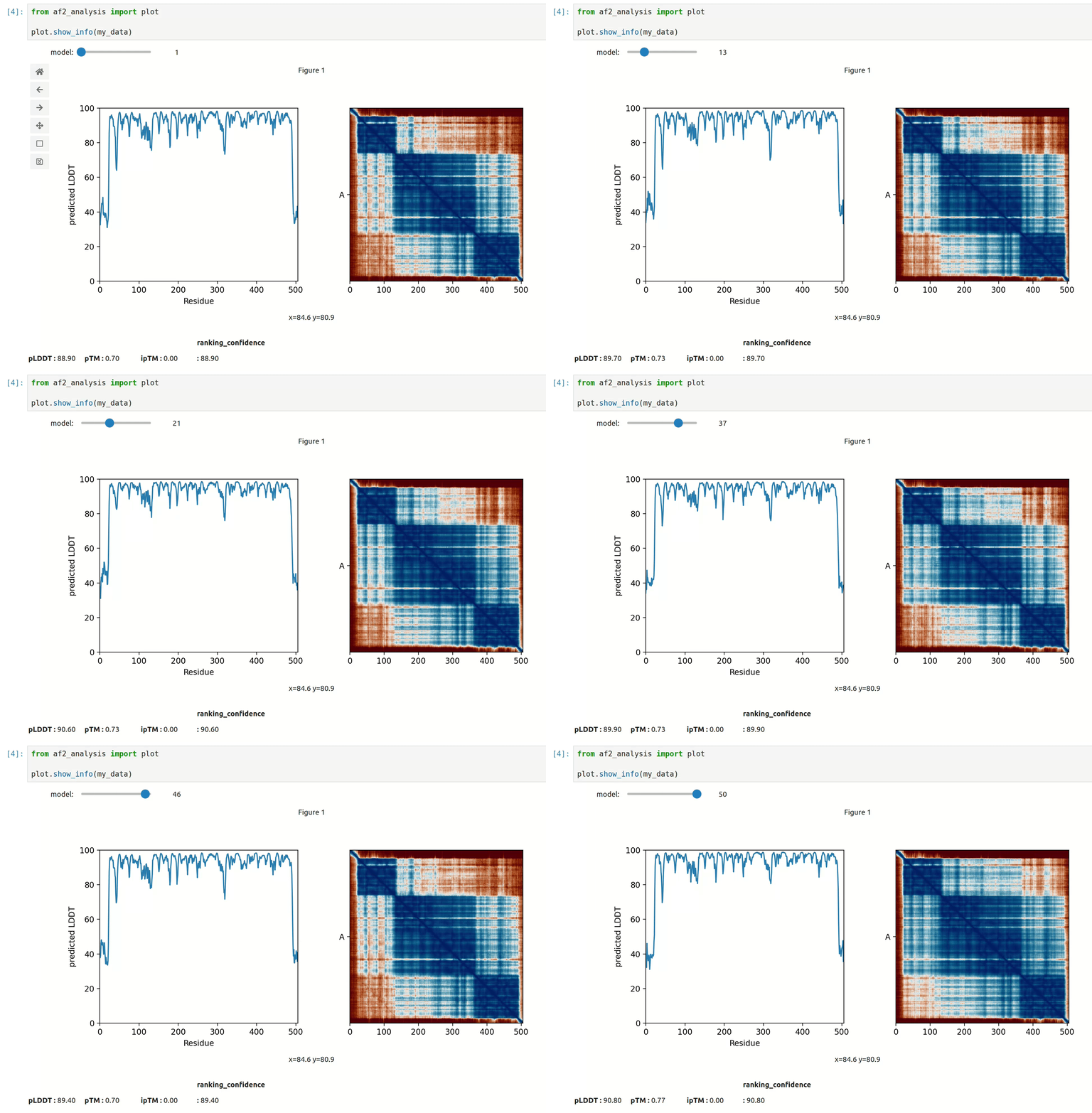
plot msa, plddt and PAE:
my_data.plot_msa()
my_data.plot_plddt([0,1])
best_model_index = my_data.df['ranking_confidence'].idxmax()
my_data.plot_pae(best_model_index)
show 3D structure (
nglviewpackage required):
my_data.show_3d(my_data.df['ranking_confidence'].idxmax())
GUI
af-analysis includes an optional web-based graphical user interface (GUI) built with Flask. It allows you to load result folders, browse model tables, select models, and plot pLDDT and PAE interactively — without writing any code.
Model structures can also be visualized in 3D using Mol* directly in the browser. The GUI is designed to be user-friendly and accessible to researchers who may not be comfortable with command-line tools.
pdockq2, LIS score, and ipSAE can also be calculated directly from the GUI, allowing users to quickly assess the quality of their models and make informed decisions about which ones to focus on for further analysis.
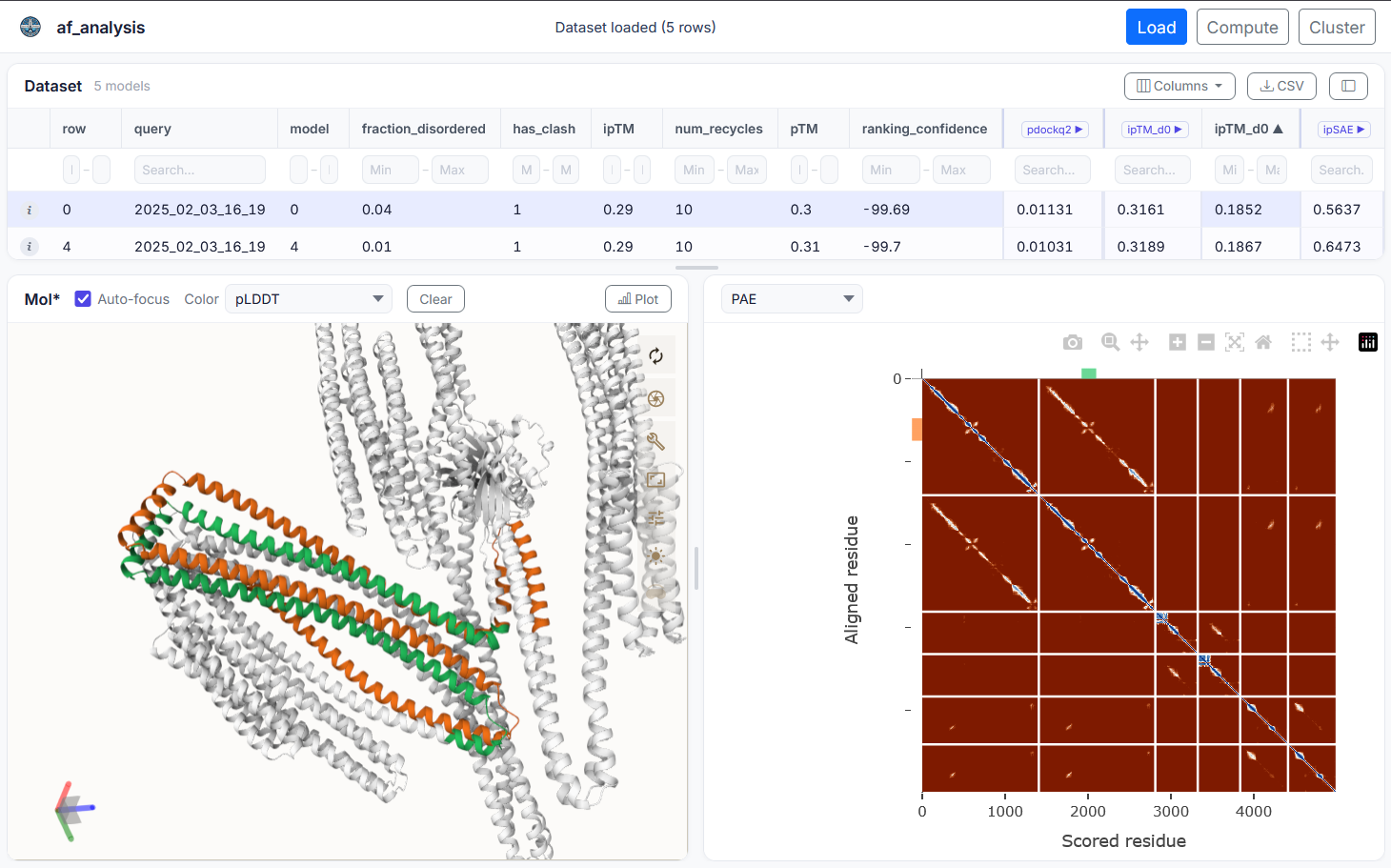
Install and launch the GUI with:
pip install "af-analysis[gui]"
af_analysis_gui
Then open http://127.0.0.1:5000 in your browser.
Dependencies
af_analysis requires the following dependencies:
pdb_cpppandasnumpytqdmseaborncmcrameringlviewipywidgetsmdanalysis
as well as the optional dependencies for the GUI:
Flaskplotly
Contributing
af-analysis is an open-source project and contributions are welcome. If
you find a bug or have a feature request, please open an issue on the GitHub
repository at https://github.com/samuelmurail/af_analysis. If you would like
to contribute code, please fork the repository and submit a pull request.
Release a new package version - Only for maintainers
To release a new version of the package, follow these steps:
Commit the changes and push to GitHub:
git add .
git commit -m "Update of ..."
git push origin main
Update the version number in using bump-my-version:
bump-my-version bump <part>
where <part> is one of major, minor, or patch depending on the type of release.
Commit the changes and push to GitHub:
git add .
git commit -m "Bump version to x.y.z"
git push origin main
Create the pypi package and upload it:
make release
Remember that a valid .pypirc file must be present in your home directory with the correct credentials.
Citing this work
If you use the code of this package, please cite:
Reguei A and Murail S. Af-analysis: a Python package for Alphafold analysis.
Journal of Open Source Software (2025) doi: 10.21105/joss.07577
@Article{reguei_af-analysis_2025,
	title = {Af-analysis: a {Python} package for {Alphafold} analysis},
	volume = {10},
	issn = {2475-9066},
	shorttitle = {Af-analysis},
	url = {https://joss.theoj.org/papers/10.21105/joss.07577},
	doi = {10.21105/joss.07577},
	language = {en},
	number = {107},
	urldate = {2025-03-14},
	journal = {Journal of Open Source Software},
	author = {Reguei, Alaa and Murail, Samuel},
	month = mar,
	year = {2025},
	pages = {7577},
}
License
This project is licensed under the GNU General Public License version 2 - see the LICENSE file for details.
References
Jumper et al. Nature (2021) doi: 10.1038/s41586-021-03819-2
Abramson et al. Nature (2024) doi: 10.1038/s41586-024-07487-w
Mirdita et al. Nature Methods (2022) doi: 10.1038/s41592-022-01488-1
Evans et al. bioRxiv (2021) doi: 10.1101/2021.10.04.463034
Bryant et al. Nat. Commun. (2022) doi: 10.1038/s41467-022-28865-w
Zhu et al. Bioinformatics (2023) doi: 10.1093/bioinformatics/btad424
Kim et al. bioRxiv (2024) doi: 10.1101/2024.02.19.580970
Yu et al. Bioinformatics (2023) doi: 10.1093/bioinformatics/btac749
Wohlwend et al. bioRxiv (2024) doi: 10.1101/2024.11.19.624167
Chai Discovery et al. bioRxiv (2024) doi:10.1101/2024.10.10.615955v2
MassiveFold Raouraoua et al. Nat. Comput. Sci. (2024) doi:10.1038/s43588-024-00714-4
Dunbrack. Biorxiv (2025) doi: 10.1101/2025.02.10.637595
TODO
check with the original implementation of pDockQ2 that the results are the same
Same for LIS/LIA